-->

19/08/2012

OAuth Basics


This sure looks like a Branded Car Logo . . . Isn't it.
No, this represents the new authentication mechanism on which most of the sites are working today.

OAuth - Open Authentication.

I love Valet key example. Many luxury cars come with a valet key. It is a special key you give the parking attendant and unlike your regular key, will only allow the car to be driven a short distance while blocking access to the trunk and the onboard cell phone. Regardless of the restrictions the valet key imposes, the idea is very clever. You give someone limited access to your car with a special key, while using another key to unlock everything else.

26/07/2012

Html GridView in MVC3

When ever we need to create a grid in MVC 3, we often end up with Telerik grids, due to awesome features and support. But you need to have a licensed version of controls.
What if you don't have license for it and you have to create a Gridview of your own, like below.
Its very simple, and all you need to create is a little Html, JQuery and supporting Action Methods.
Lets see how . . .

14/07/2012

Implementing & Consuming ASP.NET WEB API from JQuery (MVC 4)


In this post we will see how to create a our own WEB API service and will consume it in client using JQuery.
This is the UI i am planning to create, which in-turn talk to a ASP.NET WEB API Service for rendering data. We need to create a API Service and an Application consuming it.
Lets do it step by step.

ASP.NET WEB API Basics (MVC 4)


In earlier post we read about how WEB API evolved and what are the features that made it as one of the best frameworks to build or consume HTTP Services.

While going through the post, keep one thing in mind that WEB API is REST Complaint, so it typically consists of Get(),Put(),Post(),Delete() methods.
           Method                                        URL Structure
             Get()                                            api/Values
             GetItem(int i)                              api/Values/i
             Post (i)                                         api/Values/i with Post method
             Delete(i)                                      api/Values/i with Delete method.

Before writing tons of your custom code, lets see what the default scaffold template has given for a WEB API interface.

13/07/2012

History Behind ASP.NET WEB API

ASP.NET WEB API: 
It is a framework for building and consuming HTTP services that can reach a broad range of clients including browsers and mobile devices. It’s also a great platform for building RESTful services. ASP.NET Web API takes the best features from WCF Web API and merges them with the best features from MVC.
Even before touching code, we need to know why WEB API?

It started with WCF

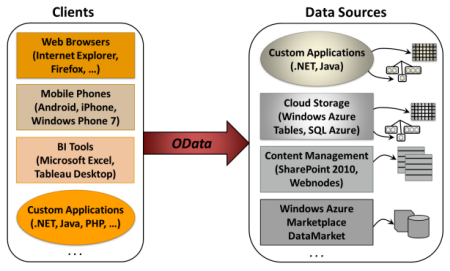
OData

OData defines an abstract data model and a protocol that let any client access information exposed by any data source. Figure 1 shows some of the most important examples of clients and data sources, illustrating where OData fits in the picture.
 Before going into more details , first look into below videos explaining What and Why.

07/07/2012

Merge in SQL 2008


Many a times we came across situation to merge records between two tables. It will be like incremental update i.e., add new records and update existing records based on a reference column.

We usually accomplish this in two statements.
1. A join statement to update records.
2. A insert statement for new records.

Lets execute and see how this works.

11/06/2012

MVC - DI & Unity with Lifetime Manager


In this post we will see 2 important things.

1. Using Unity Dependency Resolver
2. What is Lifetime manager and its significance.

02/06/2012

Google Page Preview & Google API in MVC Razor


Look at this . . .


Isn't this different from Google home page. Yes it is. This is my custom MVC Razor search page, which i have created with full features of Asynchronous data retrieval, displaying Page Preview . As i cannot write such a powerful search algorithm, i am still using Google API here.

30/05/2012

MVC Razor - In Progress Icon


"In Progress Icon" is the best way of intimating a client about server side action, so that he can wait until it is completed.
In this post we will see how to display one in a MVC Razor application.