-->
Showing posts with label Azure. Show all posts

11/05/2026

Azure Disk Encryption Is Retiring in 2028 — Everything You Need to Know

The Big Picture

Azure gives you five overlapping ways to encrypt VM disk data. They sound similar, use some of the same terminology, and the Azure portal mixes them all together in the "Encryption" blade — which makes choosing correctly genuinely confusing. Then in late 2025, Microsoft announced that one of the most commonly used options — Azure Disk Encryption (ADE) — is being retired. If you have ADE-encrypted VMs and you do nothing before September 15, 2028, your disks will fail to unlock after any reboot.

Retirement alert: Azure Disk Encryption After September 15, 2028, ADE-enabled workloads will continue to run — but encrypted disks will fail to unlock after VM reboots, causing service disruption. All ADE-enabled VMs (including backups) must migrate before this date. There is no in-place migration path; you must rebuild the VM.

This article covers what each option actually does, where it operates in the stack, detailed pros and cons, and a clear decision guide — plus the full migration picture.


02/04/2026

Authenticating Azure Foundry OpenAI Using Managed Identity

In earlier post we have tested 30+ features of various Azure Foundry Open AI services.

Post: https://pratapreddypilaka.blogspot.com/2026/04/azure-ai-services-complete-guide-to.html

Most of the code have saved all the Open AI service keys in an environment file following Python best practice. But this is done only for practice purpose, just to get familiar with Open AI services and how to access those services using Python code.

Saving the Access keys in code is the worst possible security blunder you can do. Access keys will completely bypass all the RBAC controls and give complete access to anyone.

What are the ways to authenticate Azure Open AI services without exposing the keys?

  • System Assigned Managed Identity — Auto-created identity tied to an Azure resource (VM, App Service, Functions)
  • User Assigned Managed Identity — Standalone identity you create and attach to one or more Azure resources
  • Service Principal + Client Secret — App registration with a secret, works anywhere including on-prem
  • Service Principal + Certificate — Same as above but uses a certificate instead of secret, more secure
  • Azure CLI Credential — Uses the logged-in az login identity, ideal for local dev/testing
  • Interactive Browser Credential — Pops a browser login window, good for desktop tools
  • Device Code Credential — Prints a code to enter at a URL, useful for headless servers
  • DefaultAzureCredential — Tries multiple methods automatically in order, recommended for most cases
  • Workload Identity — Federated keyless auth for pods running in Azure Kubernetes Service (AKS)
  • Federated Identity Credential — Allows external IdPs like GitHub Actions or GitLab to authenticate without any secrets

Managed Identity is the preferred method for Azure workloads to access Open AI services.

In this article we will have a look at how we can authenticate using Managed Identity.

For this we need a VM up on which we will enable system managed Identity.

I created a Linux VM, and enabled the managed identity.

Now, go to Foundry, go to Access control, and Add a new role assignment for the managed identity we created earlier with role being "Cognitive Services OpenAI User".

Now create the rules for NSG to open the communication between OpenAI services. This is necessary if you are using a private endpoint for the OpenAI instance.

Login to your virtual machine.

Now in order to test the connectivity, I am installing Python and Azure-Identity.

# Python & pip
sudo apt update && sudo apt install python3-pip -y

# Required packages
pip3 install openai azure-identity

Once all the dependencies are installed, we will create a file with the below code.

from azure.identity import ManagedIdentityCredential
from openai import AzureOpenAI
import os

# ── Config ──────────────────────────────────────────────
AZURE_OPENAI_ENDPOINT = "https://prata-mhl58p7n-eastus2.cognitiveservices.azure.com/"
DEPLOYMENT_NAME       = "gpt-5-chat"   # e.g. gpt-4o
API_VERSION           = "2024-02-01"
# ────────────────────────────────────────────────────────

# 1. Obtain a token via Managed Identity (no keys!)
credential = ManagedIdentityCredential()
token       = credential.get_token("https://cognitiveservices.azure.com/.default")

# 2. Build AzureOpenAI client using the bearer token
client = AzureOpenAI(
    azure_endpoint = AZURE_OPENAI_ENDPOINT,
    api_version    = API_VERSION,
    azure_ad_token = token.token,       # <-- token-based, not key-based
)

# 3. Call the model
response = client.chat.completions.create(
    model    = DEPLOYMENT_NAME,
    messages = [
        {"role": "system", "content": "You are a helpful assistant."},
        {"role": "user",   "content": "Hello! Tell me more about Managed identity authentication without using access keys for Azure Open AI"}
    ]
)

print("✅ Response:", response.choices[0].message.content)

Now run the python file python3 chat.py

You will get the response from your gpt-5-chat model, without using access keys.

Azure AI Services - A Complete Guide to Building Intelligent Applications with Azure AI Foundry

A while ago i started exploring Azure AI Foundry and ended up going down a rabbit hole of 30+ implementations covering everything from GPT-5 chat to live speech transcription. In this post i will walk you through all the major Azure AI services, what they do, how to implement them, and when to use them — so you don't have to figure it all out the hard way like i did.

You can download git repo and start embedding your Azure OpenAI Service keys in.env file and start executing them as we go along.

Our objective is to understand the complete Azure AI Services ecosystem and how you can combine them to build enterprise-grade intelligent applications.


Azure OpenAI - GPT-5 Chat, Vision and Code

This is where most people start, and for good reason. Azure OpenAI gives you access to GPT-5 with enterprise-grade security, regional deployment and SLAs — unlike calling OpenAI directly.

The basic setup is straightforward. You initialize an AzureOpenAI client with your endpoint and API key, define a system role (something like "you are a helpful travel assistant"), pass in user messages and configure temperature and top_p for response behavior. That's it, you are doing conversational AI.

from openai import AzureOpenAI
from azure.core.credentials import AzureKeyCredential
from dotenv import load_dotenv
import os

load_dotenv()
client = AzureOpenAI(
    azure_endpoint=os.getenv("AZURE_OPENAI_ENDPOINT"),
    api_key=os.getenv("AZURE_OPENAI_KEY"),
    api_version="2024-12-01-preview"
)

What makes it more interesting is Vision. You can encode an image to base64, pass it as image_url in the message content, and GPT-5 will analyze and explain it — diagrams, screenshots, anything. I used this for code explanation too. Point it at a source file with a "you are a teacher" system prompt and let it stream the explanation back. Really useful for documentation generation and code reviews.

Chat Output:


Image Reading Output:


27/11/2023

Azure FinOps using Terraform and Infracost - Finding the hourly or monthly cost before Azure DevOps Deployments

A while ago i created a demo for Azure VWAN using  terraform and Azure DevOps. I dive headfirst without realizing that i am using premium SKU for firewalls and my Dev teant is shutdown for a month in few days due to my billing cap of 230 NZD.

Next time when i create a demo for APIM instances, i dint realize Premium SKU costs 7500 NZD/month. Even before i finish my POC, the teant again shutdown in few hours this time.

Our objective is to find the cost of the IAC we are deploying even before we deploy. 
In this post i will show how we can utilize Infracost a opensource plugin in both VSCode and how we can make it part of our Azure DevOps pipelines to manage cost of the resources we are going to deploy.

Like this :

or like this:

16/07/2023

Azure DevOps Self-Hosted Agents Automation Using Packer and Terrafrom

In Azure DevOps, "self-hosted agents" refer to agent machines that you set up and manage yourself, instead of using Microsoft-hosted agents. These self-hosted agents can be beneficial in various scenarios:

    Security and Compliance: In some organizations, data security and compliance policies may require running build and deployment processes on infrastructure managed within their own network.

    Access to Internal Resources: Your build and deployment processes may require access to internal resources (databases, network drives, etc.) that are not accessible from external Microsoft-hosted agents.

    Performance and Customization: Self-hosted agents can be tailored to specific hardware configurations, which might be necessary for resource-intensive builds or specialized build environments.

    Cost Management: Azure DevOps provides a certain number of free Microsoft-hosted parallel jobs, but if you have large-scale or resource-intensive projects, self-hosted agents can be more cost-effective in the long run.

    Reducing Build Queue Times: When using Microsoft-hosted agents, you share resources with other users, which might result in longer build queue times. Self-hosted agents allow you to control the resources dedicated to your builds, potentially reducing waiting times.

    Offline Environments: If you have environments without continuous internet access, self-hosted agents can be used to facilitate builds and deployments within those isolated networks.

In this post i will be:
  1. Generating a Managed VM Image using Packer.
  2. Saving the Managed image to a Image gallery within my tenant.
  3. Create a Virtual Machine Scale Set(VMSS) from the said image.
  4. Register the VMSS as DevOps Self-Hosted agents.
  5. Run a time intensive project using self-hosted pool to see how VMSS will autoscale.
  6. Then update the VM image with new build and see how we can update the existing Self-hosted agents.


07/07/2023

Terraform Azure Application Landing Zone - TF AZ Bootstrap

Objective: This post is to provide a kick strat your Azure DevOps journey by providing a Seed Repo for your Azure DevOps organization. Every time when a new application is about to be launched into Azure, you have to go through the provisioning of launchpad and Devops Repo and building the CI/CD pipelines. Below project will address all of those concerns. 

Now i want to create similar thing and add couple of more steps and make it avilable for everyone.

Here is what you gona get.


11/06/2023

Deploying Virtual WAN using Terraform & Azure DevOps

Let me summarize Azure networking options based on usecase:

  • You need network connectivity between resources across different virtual networks in same region, you need to implement VNet peering.
  • You need connectivity between resources in virtual networks spanned across different region, you need to implement Global VNet peering.
  • You need network connectivity between your Organization (On-Prem) and your azure tenant and you are ok to have the secure channels over the internet, You need to implement site to site VPN gateways.
  • You want network connectivity between your offices to azure tenancy with high throughput and not over internet, you need to implement Express Route.
  • You need individual users to use services hsoted in your Azure tenant, you will implemnet Point-to-site VPN gateway.

 All the above implementations are different on thier configurations and they each cater for each use case in its own capacity.

Here is why you need to choose Virtual WAN if you are already using more than 2 capabilities mentioned above.

  •  VWAN brings all of the above network connectivity implemntations under one centralized platform.
  • VWAN automatically deployes one hub in each choosen region which implements Hub-spoke network design by default.
  • Site-to-Site VPN gateways supports max of 10, 30 and 100 tunnels in Basic, Standard and HighPerformance SKUs. VWAN supports upto 1000 branch conncetions per VWAN hub, which can throuhput at 20GBps per hub.
  • Though private communication between VNets in both VNet Peering and VWAN are ecrypted over MS backbone network, Adding additional firewall security is way easier in VWAN comapred to VNet peering.
  • VWAN has most of the above services deployed across all avilability zones in a given region thus making it more relaible and scalable without any manual intervention.
  • Virtual WAN provides many functionalities built into a single pane of glass such as site/site-to-site VPN connectivity, User/P2S connectivity, ExpressRoute connectivity, virtual network connectivity, VPN ExpressRoute Interconnectivity, VNet-to-VNet transitive connectivity, Centralized Routing, Azure Firewall and Firewall Manager security, Monitoring, ExpressRoute Encryption, and many other capabilities. Pick and choose what you want.

More information is available on MS Documentation. All refrence links are provided at the end of the article.

Now the title of artice is no "Why VWAN?" it says "Deploying VWAN using Terrafrom & Azure Devops". So lets jump in to deployment.

26/03/2022

How to build subscription based security around Azure functions

Working in company which deals with hundreds of client azure tenants showed me how different it is working on your own tenant.

Recently i worked on a subscription based service and i want to show you how to build the secruity walls arround your azure functions.

Here is an example of subscriotion service which caters differently for each client based on thier type of subscription. Free or Paid or Premium. 

10/02/2022

Azure PIM Provisioning and Configuration

Setting up PIM Administrator

Global Admins enable PIM provisioning and create PIM Admin role assignment.

PIM Admin Account Pre-requisites:

PIM admin account need to have below 2 licenses assigned.

  1.  Azure AD Premium P2
  2.  Enterprise Mobility + Security (EMS) E5

PIM Admin Setup:

1. Login to Azure portal as Global admin, navigate to Azure Active Directory.

2. In Featured highlights, click on
3. Click on “Azure AD roles” in left pane=> Navigate to “Roles” by clicking on
4. Search for “privileged role administrator”.


5. Click on “Privileged Role Administrator” role. Click on
6. Follow below configuration

Field

Value

Reason

Selected Member(s)*

PIM Admin Account

This should be an account which will be permanently treated as PIM admin

Assignment type

Eligible

This means PIM admin account is always eligible, but not active. PIM admin need to activate this role every time the changes need to be made to PIM configuration

Permanently eligible

YES

Always eligible, but not active.

 7. PIM Admin setup is finished.

22/05/2021

Containerize ASP.Net Core app on Azure Kubernetes Cluster

In my earlier post, we have deployed ASP.Net Core application to a Container hosted by a Linux Server.

There are some problems with this approach.

  1. What if the Host VM is stopped?
  2. What if Container Instance is stopped?
  3. How do we manage the deployment of any app changes?
  4. Even when we stop Host VM, you still be paying for the Disk allocated. How we can avoid that?

This is where Azure Kubernetes comes into the picture. 

Azure Kubernetes provide serverless CI/CD experience which also manages Health, Security, Auto-Scaling, Deployment and Governance aspects. More details can be found here

In this article we will be:

  • Deploy a ASP.Net Core App to a Container
  • Create a Container Image from .Net Core Container
  • Push the Image to Azure Container Registry
  • Use Kubernetes to Pull that image and create mutliple instances of the container in Kubernete Pods.
  • Expose the .Net Core App via Azure Load-Balancer.

09/05/2021

Containerizing ASP.Net Core Application on a Linux Host

In this article we will see how to deploy a ASP.Net Core 3.1 Webapplication to a container hosted on a Linux Host.
Beofore we jump into implementation, we need to look at every component and know what it does.


1. Host: This can be a Linux or Windows server. Considering Linux servers have used from long time for contanerization, i picked it. But Windows is very close choice considering all the capabilities it acquired in last 2 years.

2. Docker: It is the engine we use to host our containers. It will package the application with its dependecies and run them in isolated containers on the host.

3 Reverse Proxy Server: This will be sitting behind the firewall and redirects the user requests to appropriate apps/containers. This will provide extra layer of abstraction and reduces the public exposure of the containers. 

4. Kestrel Web Server: When you install a .Net Core SDK, it will internally create a webserver to act as a backend server for the .Net Application. Proxy server will be sending the client calls to Kestrel Web server and responds back with the output from .Net App.

5. App: .Net Core Application we deploy to be containerized. 

05/05/2021

Azure Service Bus - Queues and Topics - Part 2

Use Case: Organization X has a large-scale distributed serverless application environment. There are some azure components that sends a private messages which need to be accessed only once by other components using RoleBasedAccessControls. There are some messages that need to Fan-Out(one-to-many) to large number of systems, where sender doesnt need to know the receiver's details. The message should stay until time out, for receiving components to consume when they are avilable.

In the earlier article, we have seen how we can use Azure Service Bus Queues for integration of serverless application environment. Now we will explore Service Bus Topic and how it will be used.


We have already created Azure service Bus in earlier article, you can reffer the link provoided at the top for details.

Azure Service Bus - Queues and Topics - Part 1

Use Case: Organization X has a large-scale distributed serverless application environment. There are some azure components that sends a private messages which need to be accessed only once by other components using RoleBasedAccessControls. There are some messages that need to Fan-Out(one-to-many) to large number of systems, where sender doesnt need to know the receiver's details. The message should stay until time out, for receiving components to consume when they are avilable.


In this article, we will learn what is Azure Service Bus, Service Bus Queues, Service Bus Topics, How to access them programatically using .Net. Once you do it practically following my instrctions, you will understand the theory behind it. So follow me.

Why Azure Service Bus?
Service Bus is a message broker which handles Integrity, Security, Communication protocols of Messages at Enterprise level.

Azure Messaging Models

 All of this is straight from Microsoft Documentation. I am just grouping them for better reference. 

Every time i say, "This is what Microsoft says, and then i validate the theory with a practicle implementation". This time, this article is full of thoery, so this is all about what Microsoft says. I take no credit for this infromation.

03/05/2021

Azure Durable Functions - Starter, Orchestrator and Activity Fucntions

Use Case: A user starts to book a trip, which consists booking a Flight and Hotel and then pay for complete trip. 

Back in the day, the answer used to be a single server-side application which is complex enough to take care of everything. Now we call it Monolith application. 

Now we use microservices architecture to seperate the concerns at domain level. With Function as a Service, it even evolved to a Serverless state, where you can provision the services even without using any infrastructure.

Azure Functions is one of the critical components of serverless designs, and here is what we know about them:

Even-Driven: Azure functions are invoked based on a trigger caused by events like making a http call (or) adding a message to a Queue (or) adding a object to a blob storage (or) adding a new record to CosmosDB and many others.

Short-Lived: Azure functions are meant to for short period of excutions and to address a simple tasks which makes it more suitable for Microservices part of the design. Keep it simple and seperated.

Stateless: Azure Functions doesnt save any state infirmation of objects, thus the trigger mechanism will have both inputs and outputs. 

Now considering above facts, i have created a design for above Use Case.

Now the deisgn is pretty much simple and self-explanatory. But here is the catch.

30/04/2021

Azure Functions Basics - Part 2

In earlier post, we have built the green part of below app. Part-1


Now lets continue building red part of the design.

Azure Functions Basics - Part 1

Azure Function: Azure Functions is a serverless application platform. It allows developers to host business logic that can be executed without provisioning infrastructure. Functions provides intrinsic scalability and you are charged only for the resources used. You can write your function code in the language of your choice, including C#, F#, JavaScript, Python, and PowerShell Core. Support for package managers like NuGet and NPM is also included, so you can use popular libraries in your business logic.

Says Microsoft, now we will build some simple stuff shown below and understand basics while we do so.

25/04/2021

Azure Policy and Compliance Management

Azure Policy helps to enforce organizational standards and to assess compliance at-scale. Through its compliance dashboard, it provides an aggregated view to evaluate the overall state of the environment, with the ability to drill down to the per-resource, per-policy granularity.

Thats what Microsoft documentation says.  Now let me say in my way.

I work in a bank and the regulatory compliance says, data of our bank shouldn't leave Autralia.

So if one of our developers deployed a production azure resource in any other AZ Regions, our organization has to pay big penalties for not complying with regulations.

How do we do it? Using Azure Policy Assignment.

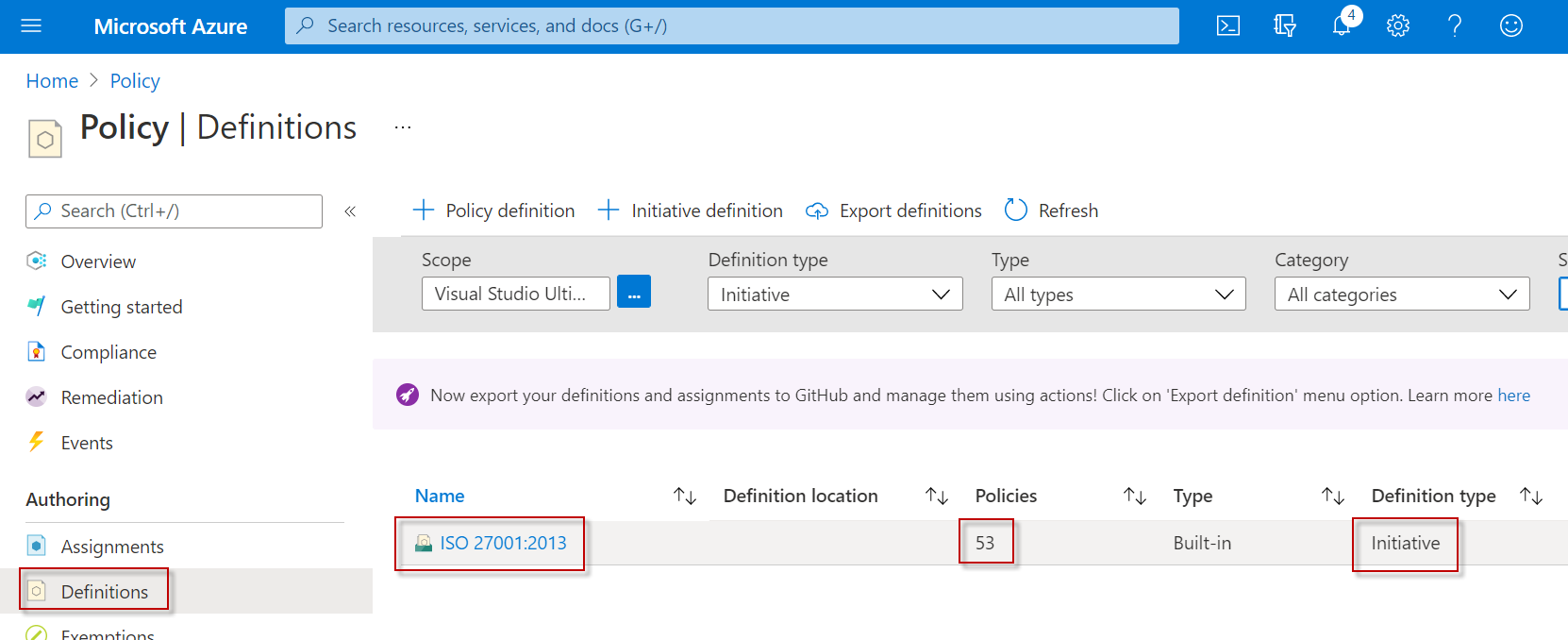
Before we jump on to implemntation, you need to know about difference between Policy and Initiative.

To keep it simple, Policy is a rule and Initiave is a collcetion of policies which set a standard.

Eg: ISO(standard) is a Intiative, which comprises of  many policies which makes that standard.

15/08/2020

Azure DevOps 101 - Creating your first Build and Release Pipelines for automated deployments to DEV, QA and PROD

DevOps: I cannot do justice to DevOps in a single article. Its an Ocean. But for our purposes here is what i would say if some one asks me about it.

"DevOps is a practice in which all the stakeholders were actively involved in entire lifecycle of product from Development , Testing, Productionizing and Production Support."

Core values of DevOps defined by CAMS - Culture, Automation, Measurement and Sharing.

This is eagle eye view of the core values.

Lets talk about second core value, Automation. Its not about just automation of everything in software life cycle.

Automation: It talks about fastening stages of SDLC with continuous integration and delivery thus reducing effort and time to roll new changes. Multiple changes getting tested and deployed in a day - make people's life a lot better. Please keep in mind "Automation" in DevOps means giving prefference to "People over Process over Tools". 

Please reffer to various guides or gurus for deep dive into DevOps.

Our objective here is to implement CI/CD (Continuous Integration / Continues Delivery) in Azure and learn how to cofigure your first Azure Devops Build and Release pipelines. Using which we will push our code to various stages DEV, QA and PROD. 

07/07/2018

Basics of Bot Development

What is a Bot?
To begin with , If i think i can give better conventional explanation than Microsoft about "What is a BOT?", I will be an idiot.  Check here for that conventional stuff.
But, i have funny way to begin this series.


Got it ?
Jokes aside, The way we have a automated robot to do regular checks and clean the dust, the same way an app which performs some moderate to intelligent tasks without human intervention is a BOT. This can free man hours for better job, "Imagining and Thinking".